{
  "attachments": [
    "./207466935-8b216a84-0692-4ff2-940f-02d5108d6594.gif",
    "licecap-screen-capture-of-diagram.png"
  ],
  "title": "Animating Mermaid diagrams with terrible hacks",
  "tags": [
    "hacks",
    "mermaid",
    "gifs",
    "webdev"
  ],
  "year": "2023",
  "month": "01",
  "day": "03",
  "isDir": true,
  "slug": "mermaid-animations",
  "type": "entry",
  "date": "2023-01-03T19:00:00.000Z",
  "postName": "2023-01-03-mermaid-animations",
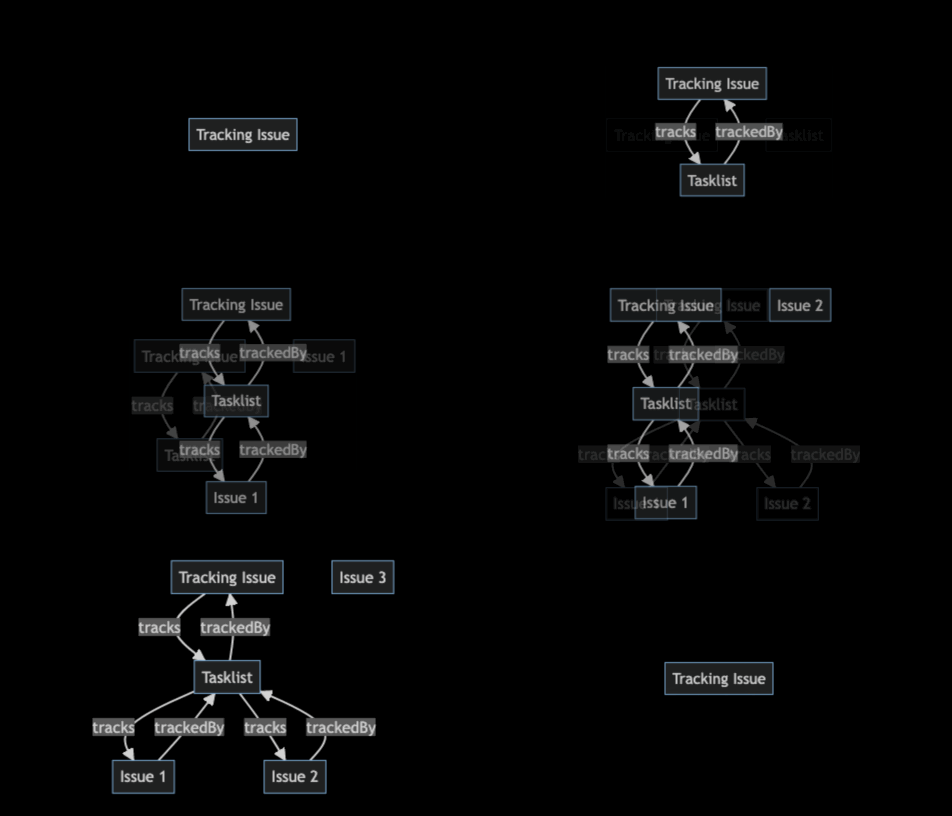
  "html": "<p>So, I wanted to produce a GIF animation of a graph diagram changing over time. What I came up with wasn't the slickest result, but it's close enough to what I'd initially imagined.</p>\n<p><img src=\"./207466935-8b216a84-0692-4ff2-940f-02d5108d6594.gif\" alt=\"\" width=\"\" height=\"\"></p>\n<!--more-->\n\n\n\n<p>One of <a href=\"https://hackers.town/@lmorchard/109507942547830293\">my earlier notions</a> was to tinker with hand-crafted SVG animations. That led me to a great feeling of exhaustion before I even began.</p>\n<p>Then I remembered that <a href=\"https://mermaid.js.org/\">Mermaid diagrams</a> are a thing. I decided what I really wanted to do was tap out some quick symbolic descriptions and let the computer do the drawing and animating for me.</p>\n<pre><code class=\"language-markdown\">graph TD\n\nA[Tracking Issue]\nB[Tasklist]\n\nA -- tracks --&gt; B\nB -- trackedBy --&gt; A\n</code></pre>\n\n<p>But, it wasn't that simple. Mermaid doesn't do animations. I scratched my head on this for awhile and felt <a href=\"https://hackers.town/@lmorchard/109508030036042755\">a growing urge to hop down a rabbit hole</a> of browser APIs to render Mermaid diagrams in a <code>&lt;canvas&gt;</code> and compose a GIF in a web page. And I could do it, too, you know - I can totally see those APIs all glued together and dancing in my head.</p>\n<p>Luckily, I managed to pull myself back from the event horizon of that yak-shaving singularity. I found that there's <a href=\"https://github.com/mermaid-js/mermaid-cli\">a <code>mermaid-cli</code></a> which can render a Mermaid diagram to an image. But, even better, I discovered that <a href=\"https://github.com/mermaid-js/mermaid-cli#transform-a-markdown-file-with-mermaid-diagrams\"><code>mmdc</code> can convert a markdown file bearing <em>many</em> Mermaid diagrams into a folder of images</a>.</p>\n<p>So, given that, I could compose a sequence of changing diagrams in one Markdown file:</p>\n<pre><code class=\"language-markdown\">## 1\n\n```mermaid\ngraph TD\n\nA[Tracking Issue]\n```\n\n## 2\n\n```mermaid\ngraph TD\n\nA[Tracking Issue]\nB[Tasklist]\n```\n\n## 3\n\n```mermaid\ngraph TD\n\nA[Tracking Issue]\nB[Tasklist]\n\nA -- tracks --&gt; B\nB -- trackedBy --&gt; A\n```\n</code></pre>\n\n<p>Running this though <code>mmdc</code> gave me the images I wanted:</p>\n<pre><code>mmdc -i index.md -o tmp/index.md -t dark -b transparent --outputFormat png\n</code></pre>\n<pre><code class=\"language-zsh\">➜  mermaid-anim git:(main) ✗ ls -al tmp \ntotal 296\ndrwxr-xr-x  13 lmorchard  staff    416 Dec 13 14:37 .\ndrwxr-xr-x  10 lmorchard  staff    320 Dec 13 13:33 ..\n-rw-r--r--   1 lmorchard  staff   6021 Dec 13 15:21 index-1.png\n-rw-r--r--   1 lmorchard  staff  27350 Dec 13 15:21 index-2.png\n-rw-r--r--   1 lmorchard  staff   3499 Dec 13 15:20 index-3.png\n-rw-r--r--   1 lmorchard  staff   3787 Dec 13 15:20 index-4.png\n-rw-r--r--   1 lmorchard  staff   9954 Dec 13 15:20 index-5.png\n-rw-r--r--   1 lmorchard  staff  12062 Dec 13 15:20 index-6.png\n-rw-r--r--   1 lmorchard  staff  19654 Dec 13 15:20 index-7.png\n-rw-r--r--   1 lmorchard  staff  21501 Dec 13 15:20 index-8.png\n-rw-r--r--   1 lmorchard  staff  27350 Dec 13 15:20 index-9.png\n-rw-r--r--   1 lmorchard  staff     98 Dec 13 15:21 index.md\n</code></pre>\n<p>Now the question was how to compile into a single GIF? Or, I guess, a video file would work - albeit in less meme-worthy fashion. (Wait, why does that matter? Nevermind, moving on...)</p>\n<p>Another rabbit hole yawned open, drawing me toward <code>ffmpeg</code> documentation and <a href=\"https://hamelot.io/visualization/using-ffmpeg-to-convert-a-set-of-images-into-a-video/\">suchlike</a>. But, I thought, I can just load up a bunch of images on a web page and cross-fade from one to another. Then, I can record a screen capture as it plays in a browser window.</p>\n<p>Here's the quick &amp; dirty page I came up with:</p>\n<pre><code class=\"language-html\">&lt;!DOCTYPE html&gt;\n&lt;html&gt;\n  &lt;head&gt;\n    &lt;style&gt;\n      body {\n        background-color: [#000](/tag/000);\n        overflow: hidden;\n      }\n      .container {\n        position: relative;\n        display: flex;\n        align-items: center;\n        justify-content: center;\n        width: 100vw;\n        height: 100vh;\n      }\n      .xfader {\n        display: block;\n        position: absolute;\n        transition: opacity 0.5s;\n        opacity: 0;\n      }\n      .xfader.fade-in {\n        opacity: 1;\n      }\n    &lt;/style&gt;\n  &lt;/head&gt;\n  &lt;body&gt;\n    &lt;div class=\"container\"&gt;\n      &lt;image class=\"xfader\" src=\"./index-1.png\" /&gt;\n      &lt;image class=\"xfader\" src=\"./index-2.png\" /&gt;\n      &lt;image class=\"xfader\" src=\"./index-3.png\" /&gt;\n      &lt;image class=\"xfader\" src=\"./index-4.png\" /&gt;\n      &lt;image class=\"xfader\" src=\"./index-5.png\" /&gt;\n    &lt;/div&gt;\n\n\n    &lt;script&gt;\n      const xfaders = Array.from(document.querySelectorAll(\".xfader\"));\n      function xfade() {\n        xfaders.forEach((el) =&gt; el.classList.remove(\"fade-in\"));\n        xfaders[0].classList.add(\"fade-in\");\n        xfaders.push(xfaders.shift());\n      }\n      xfade();\n      setInterval(xfade, 1500);\n    &lt;/script&gt;\n  &lt;/body&gt;\n&lt;/html&gt;\n</code></pre>\n<p>Not award-winning code, but it does the job. And, for me at least, this JS hackery ended up being simpler than whatever shenanigans I'd considered with regards to <code>&lt;canvas&gt;</code> or CSS or SVG animations. (And yet, you may notice that I accomplished the most dangerous trick in all of web development - i.e. vertically centering content on a web page.)</p>\n<p>And, while I guess I could have used the screen recording hotkey built into macOS, I was just really set on producing a GIF.</p>\n<p>Thanks to <a href=\"https://christianheilmann.com/2013/08/22/lightning-talk-five-tools-to-create-visuals-for-presentations/\">a blog post from Christian Heilmann way back in 2013</a>, the tool that immediately comes to mind for me is <a href=\"https://www.cockos.com/licecap/\">LICEcap</a>. It works on Windows, it works on Mac, <a href=\"https://github.com/justinfrankel/licecap\">it's GNU-licensed</a>, it's been around for years, it's great.</p>\n<p>So, I opened the page, positioned the capture frame, and recorded my GIF:</p>\n<p><img src=\"licecap-screen-capture-of-diagram.png\" alt=\"\" width=\"\" height=\"\"></p>\n<p>I already spoiled the story by opening with the end result, but here it is again:</p>\n<p><img src=\"./207466935-8b216a84-0692-4ff2-940f-02d5108d6594.gif\" alt=\"\" width=\"\" height=\"\"></p>\n<p>So, in conclusion, this is how I produced a GIF animation of a bunch of boxes and arrows and labels. It took me under an hour from start to finish - mainly because I managed to cobble together a bunch of things I already knew how to do.</p>\n<p>Of course, the process at which I arrived was not the most efficient or elegant. It could quickly become annoying to repeat. If I end up finding a need to make many more of these diagram animations - or if I find that I end up going through many cycles of revision - I might revisit a few of those rabbit holes that I circumnavigated.</p>\n<p>Anyway, maybe this could come in handy for someone else? Maybe future-me will appreciate that I wrote this down.</p>\n",
  "body": "So, I wanted to produce a GIF animation of a graph diagram changing over time. What I came up with wasn't the slickest result, but it's close enough to what I'd initially imagined.\n\n![](./207466935-8b216a84-0692-4ff2-940f-02d5108d6594.gif)\n\n<!--more-->\n\nOne of [my earlier notions](https://hackers.town/@lmorchard/109507942547830293) was to tinker with hand-crafted SVG animations. That led me to a great feeling of exhaustion before I even began.\n\nThen I remembered that [Mermaid diagrams](https://mermaid.js.org/) are a thing. I decided what I really wanted to do was tap out some quick symbolic descriptions and let the computer do the drawing and animating for me.\n\n<pre><code class=\"language-markdown\">graph TD\n\nA[Tracking Issue]\nB[Tasklist]\n\nA -- tracks --> B\nB -- trackedBy --> A\n</code></pre>\n\nBut, it wasn't that simple. Mermaid doesn't do animations. I scratched my head on this for awhile and felt [a growing urge to hop down a rabbit hole](https://hackers.town/@lmorchard/109508030036042755) of browser APIs to render Mermaid diagrams in a `<canvas>` and compose a GIF in a web page. And I could do it, too, you know - I can totally see those APIs all glued together and dancing in my head.\n\nLuckily, I managed to pull myself back from the event horizon of that yak-shaving singularity. I found that there's [a `mermaid-cli`](https://github.com/mermaid-js/mermaid-cli) which can render a Mermaid diagram to an image. But, even better, I discovered that [`mmdc` can convert a markdown file bearing *many* Mermaid diagrams into a folder of images](https://github.com/mermaid-js/mermaid-cli#transform-a-markdown-file-with-mermaid-diagrams).\n\nSo, given that, I could compose a sequence of changing diagrams in one Markdown file:\n\n<pre><code class=\"language-markdown\">## 1\n\n```mermaid\ngraph TD\n\nA[Tracking Issue]\n```\n\n## 2\n\n```mermaid\ngraph TD\n\nA[Tracking Issue]\nB[Tasklist]\n```\n\n## 3\n\n```mermaid\ngraph TD\n\nA[Tracking Issue]\nB[Tasklist]\n\nA -- tracks --> B\nB -- trackedBy --> A\n```\n</code></pre>\n\nRunning this though `mmdc` gave me the images I wanted:\n\n```\nmmdc -i index.md -o tmp/index.md -t dark -b transparent --outputFormat png\n```\n\n```zsh\n➜  mermaid-anim git:(main) ✗ ls -al tmp \ntotal 296\ndrwxr-xr-x  13 lmorchard  staff    416 Dec 13 14:37 .\ndrwxr-xr-x  10 lmorchard  staff    320 Dec 13 13:33 ..\n-rw-r--r--   1 lmorchard  staff   6021 Dec 13 15:21 index-1.png\n-rw-r--r--   1 lmorchard  staff  27350 Dec 13 15:21 index-2.png\n-rw-r--r--   1 lmorchard  staff   3499 Dec 13 15:20 index-3.png\n-rw-r--r--   1 lmorchard  staff   3787 Dec 13 15:20 index-4.png\n-rw-r--r--   1 lmorchard  staff   9954 Dec 13 15:20 index-5.png\n-rw-r--r--   1 lmorchard  staff  12062 Dec 13 15:20 index-6.png\n-rw-r--r--   1 lmorchard  staff  19654 Dec 13 15:20 index-7.png\n-rw-r--r--   1 lmorchard  staff  21501 Dec 13 15:20 index-8.png\n-rw-r--r--   1 lmorchard  staff  27350 Dec 13 15:20 index-9.png\n-rw-r--r--   1 lmorchard  staff     98 Dec 13 15:21 index.md\n```\n\nNow the question was how to compile into a single GIF? Or, I guess, a video file would work - albeit in less meme-worthy fashion. (Wait, why does that matter? Nevermind, moving on...)\n\nAnother rabbit hole yawned open, drawing me toward `ffmpeg` documentation and [suchlike](https://hamelot.io/visualization/using-ffmpeg-to-convert-a-set-of-images-into-a-video/). But, I thought, I can just load up a bunch of images on a web page and cross-fade from one to another. Then, I can record a screen capture as it plays in a browser window.\n\nHere's the quick & dirty page I came up with:\n\n```html\n<!DOCTYPE html>\n<html>\n  <head>\n    <style>\n      body {\n        background-color: #000;\n        overflow: hidden;\n      }\n      .container {\n        position: relative;\n        display: flex;\n        align-items: center;\n        justify-content: center;\n        width: 100vw;\n        height: 100vh;\n      }\n      .xfader {\n        display: block;\n        position: absolute;\n        transition: opacity 0.5s;\n        opacity: 0;\n      }\n      .xfader.fade-in {\n        opacity: 1;\n      }\n    </style>\n  </head>\n  <body>\n    <div class=\"container\">\n      <image class=\"xfader\" src=\"./index-1.png\" />\n      <image class=\"xfader\" src=\"./index-2.png\" />\n      <image class=\"xfader\" src=\"./index-3.png\" />\n      <image class=\"xfader\" src=\"./index-4.png\" />\n      <image class=\"xfader\" src=\"./index-5.png\" />\n    </div>\n    <script>\n      const xfaders = Array.from(document.querySelectorAll(\".xfader\"));\n      function xfade() {\n        xfaders.forEach((el) => el.classList.remove(\"fade-in\"));\n        xfaders[0].classList.add(\"fade-in\");\n        xfaders.push(xfaders.shift());\n      }\n      xfade();\n      setInterval(xfade, 1500);\n    </script>\n  </body>\n</html>\n```\n\nNot award-winning code, but it does the job. And, for me at least, this JS hackery ended up being simpler than whatever shenanigans I'd considered with regards to `<canvas>` or CSS or SVG animations. (And yet, you may notice that I accomplished the most dangerous trick in all of web development - i.e. vertically centering content on a web page.)\n\nAnd, while I guess I could have used the screen recording hotkey built into macOS, I was just really set on producing a GIF.\n\nThanks to [a blog post from Christian Heilmann way back in 2013](https://christianheilmann.com/2013/08/22/lightning-talk-five-tools-to-create-visuals-for-presentations/), the tool that immediately comes to mind for me is [LICEcap](https://www.cockos.com/licecap/). It works on Windows, it works on Mac, [it's GNU-licensed](https://github.com/justinfrankel/licecap), it's been around for years, it's great.\n\nSo, I opened the page, positioned the capture frame, and recorded my GIF:\n\n![](licecap-screen-capture-of-diagram.png)\n\nI already spoiled the story by opening with the end result, but here it is again:\n\n![](./207466935-8b216a84-0692-4ff2-940f-02d5108d6594.gif)\n\nSo, in conclusion, this is how I produced a GIF animation of a bunch of boxes and arrows and labels. It took me under an hour from start to finish - mainly because I managed to cobble together a bunch of things I already knew how to do.\n\nOf course, the process at which I arrived was not the most efficient or elegant. It could quickly become annoying to repeat. If I end up finding a need to make many more of these diagram animations - or if I find that I end up going through many cycles of revision - I might revisit a few of those rabbit holes that I circumnavigated.\n\nAnyway, maybe this could come in handy for someone else? Maybe future-me will appreciate that I wrote this down.\n",
  "parentPath": "./content/posts/archives/2023/2023-01-03-mermaid-animations",
  "path": "2023/01/03/mermaid-animations",
  "thumbnail": "/2023/01/03/mermaid-animations/207466935-8b216a84-0692-4ff2-940f-02d5108d6594.gif",
  "summary": "So, I wanted to produce a GIF animation of a graph diagram changing over time. What I came up with wasn't the slickest result, but it's close enough to what I'd initially imagined.",
  "needsBuild": true,
  "prevPostPath": "2022/11/07/no-ushers",
  "prevPostTitle": "There are no ushers on Mastodon",
  "nextPostPath": "2023/01/16/begging-for-treats",
  "nextPostTitle": "Begging for Treats"
}