---
title: "Review: Steam Controller"
date: 2016-02-05T12:00:00-07:00
url: https://blog.lmorchard.com/2016/02/05/steam-controller/
author: Les Orchard
tags: [reviews, gaming, steam, hardware]
---
# Review: Steam Controller
**TL;DR**: The [Steam Controller][] is an odd little duck. But, I'm rooting
for it.
[](https://www.flickr.com/photos/deusx/24726637531/in/dateposted/)
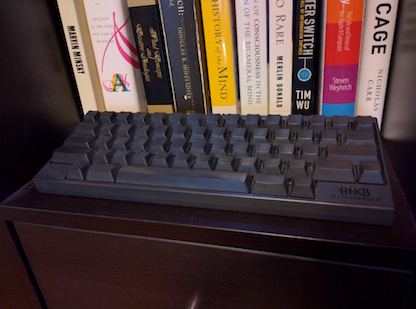
I've long been a fan of unusual input devices, the more fiddly the better.
It's been a little over 15 years since I last used a standard 104-key keyboard
on a PC, having been a [Happy Hacking Keyboard][hhkb] enthusiast ever since I
first [read about it in Linux Journal][hhkb-review].
[hhkb-review]: http://www.linuxjournal.com/article/3147
[hhkb]: http://amzn.to/1nQbo26
And, as the gaming world has invested in [increasingly complex gaming mice][gamingmice] over
the years, I've been solidly in the trackball camp since the late 1990's when
I played hours & hours of Quake 2 and Unreal Tournament.
[gamingmice]: http://icrontic.com/article/a4tech-v3-bloody-gun3-gaming-mouse-review
[](http://vgjunk.tumblr.com/post/63391681929/john-romero-wants-you-to-buy-a-mad-catz-panther-xl)
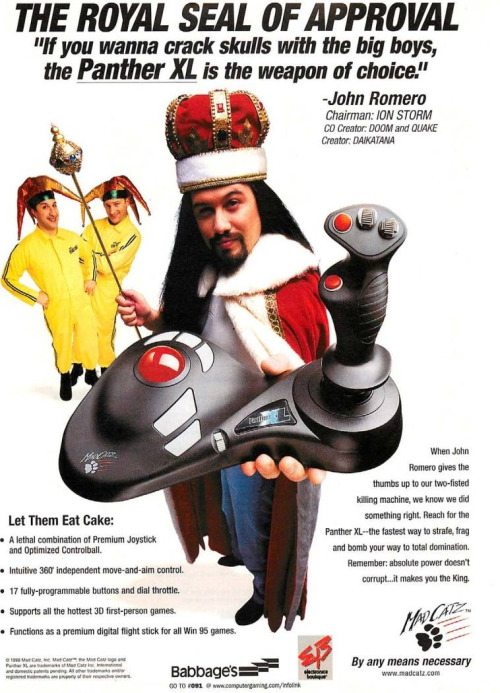
The [Mad Catz Panther XL][pantherxl] trackball-and-joystick combo
was my favorite for flight & space sims like Freespace. I used a [Microsoft
Sidewinder Strategic Commander][msssc] to play Everquest one-handed. (The
other hand was for tinkering with [ShowEQ][] on a nearby Linux machine, of course.)
[showeq]: https://github.com/brainiac/showeq
More recently, when I was playing a space trucker in EVE Online, I would often
ride a recumbent exercise bike and use a [One Finger Mouse][ofm] with my
laptop to align and warp between stations.
[msssc]: http://amzn.to/1nQby9D:
[pantherxl]: http://assassin3d.squarespace.com/history-panther-xl/
[ofm]: http://amzn.to/1NKn0bq
Given all the above, the [Steam Controller][] looked completely relevant to my
interests when [it was announced][scannounce] way back in 2013.
Fast forward to November 2015, and after many prototypes & tweaks, [it finally
arrived][screleased]. I managed to wait a month or so, watching for red flags
in early reviews. But, of course, I gave in and had it in time for my
traditional end-of-year holiday gaming binge.
[scannounce]: http://kotaku.com/valve-announces-the-steam-controller-a-new-way-to-cont-1411558137
[screleased]: http://www.theverge.com/2015/11/10/9705234/valve-steam-machines-controller-link-launch
[Steam Controller]: http://amzn.to/1nQzE4f
## Ergonomics
At [my couch PC][couchpc], I use an Xbox 360 controller whenever I can. I don't
want to clutter the living room with big weird joysticks & such.
[couchpc]: http://blog.lmorchard.com/2013/01/21/gaming-from-the-orchard-house-couch/
Besides that, having my hands in a neutral position in my lap seems to
help quite a lot with keeping wrist pain at bay after a day in my office
already spent with trackball and keyboard. But, not every game supports a
controller out of the box.
So, it seemed really promising when I read Valve's claims that the [Steam
Controller][] would work with "[games from all genres][steamhardware]"
including titles typically bound to a keyboard and mouse.
[steamhardware]: http://store.steampowered.com/app/353370/
[](https://www.flickr.com/photos/deusx/24524584120)
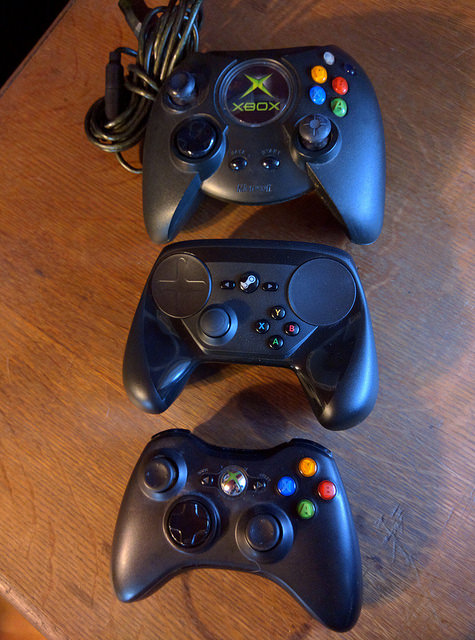
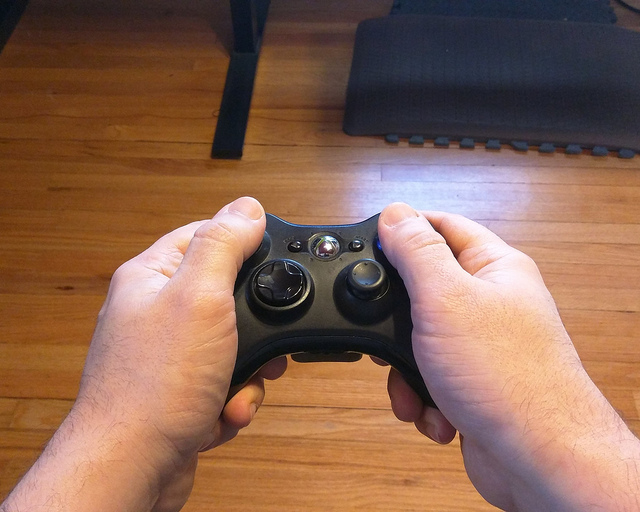
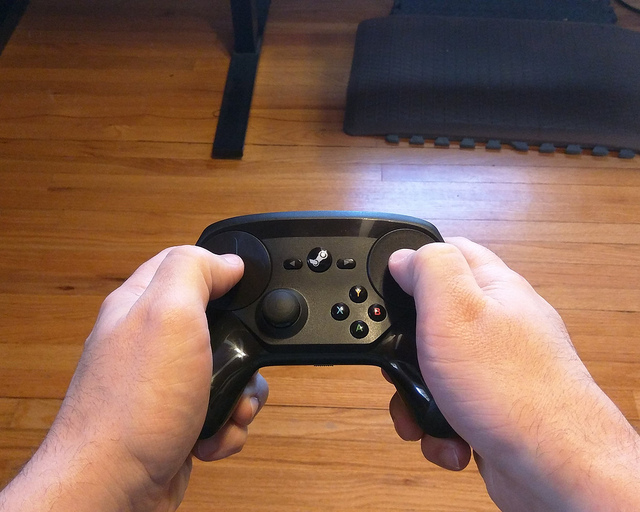
Now that I've got the [Steam Controller][] in my hands, it makes my Xbox 360
controller feel tiny. It reminds me a little of the original Xbox controller.
Though, it's really unfair to take that comparison too far - I mean, that
thing was bigger than some actual game consoles.
The Xbox 360 handles taper down into rounded points that cover a third of my
palm. But, the [Steam Controller][] bulges out at the bottoms and covers about
half of my palm.
It's like the difference between a small chicken egg
and a jumbo. (Sorry, I've been cooking today.) And where my fingers curl
inward toward my palm with the 360 controller, the [Steam Controller][] has
them pointing more toward my chest to accomodate the thicker grips.
[](https://www.flickr.com/photos/deusx/24206620773/in/datetaken/)
[](https://www.flickr.com/photos/deusx/24740006121/in/datetaken/)
(And, this is where I realize I was never destined to be a [hand model][].)
[hand model]: https://www.youtube.com/watch?v=PZxX3-rJoNI
The Xbox 360 controller feels like curved handlebars between
my palms and the last three fingers, leaving just my index fingers and thumbs
free to move. It could be that I've gotten used to it over the years, but the
design of this controller feels like it naturally falls into my relaxed
hands after I've flopped them lazily into my lap.
The [Steam Controller][], though, seems to call for a more tense grip that I
can feel in my shoulders & wrists after awhile.
To keep things stable as I play, I find myself using some arm muscle & elbow
pressure to wedge it between the bony first knuckles of my index fingers and
the bases of my thumbs. Except for a little stabilization from my pinkies and
ring fingers, this leaves the rest of my fingers free to reach the thumbpads
and buttons.
[](https://www.flickr.com/photos/deusx/24726646081/in/dateposted-public/)
[](https://www.flickr.com/photos/deusx/24702264542/in/dateposted-public/)
The face of the Xbox 360 controller follows a convex curve. When relaxed, my
extended thumbs arch over that curve, their pads resting on the left stick and
right button cluster.
The face of the [Steam Controller][] is concave, almost the inverse of the
other controller. My bent thumbs hover over a pair of circular trackpads,
which are far better controlled with strokes from thumb tips than by swiping or
rolling flat thumb pads across them.
[dpbone]: https://en.wikipedia.org/wiki/Phalanx_bone#Distal_phalanx
Overall, I can't say I'm entirely comfortable with the [Steam Controller][] in
my hands. That worries me a little after years of being unkind to my wrists.
I'm still adjusting my grip on the thing, though. Maybe I'll get used to it.
After all, I spent years with the first NES gamepad - and it was no ergonomic
marvel.
## Hardware
In terms of input hardware, the [Steam Controller][] offers interesting
improvements over my trusty old Xbox 360 controller.
[](https://www.flickr.com/photos/deusx/24525157630/in/photostream/)
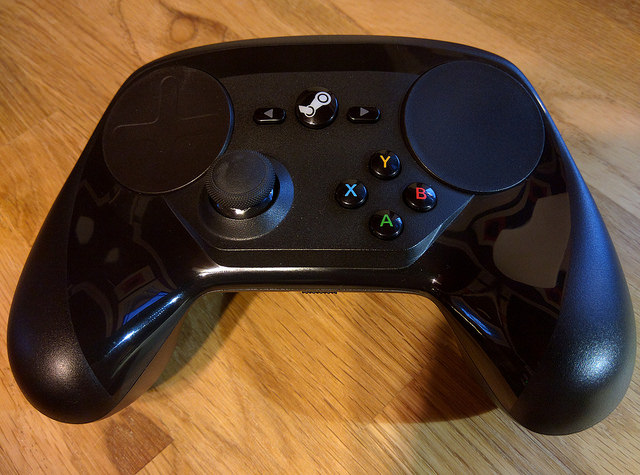
On the front, there's the "Valve" button flanked by a back & start buttons.
There's also an analog clicky joystick and an X/Y/A/B button cluster.
But, the [Steam Controller][]'s special sauce is the pair of trackpads at the
top of the controller. More detail about those when I get to writing about the
software.
Beneath these trackpads are the [linear resonant actuators][lra] used for haptic
feedback. Interestingly, I haven't found any games that can use these haptic actuators
to generate in-game vibration. They seem limited to haptics for controller
modes, so far.
[lra]: http://www.precisionmicrodrives.com/vibrating-vibrator-vibration-motors/linear-resonant-actuator-lra-haptic-vibration-motors
[](https://www.flickr.com/photos/deusx/24820691505/in/dateposted/)
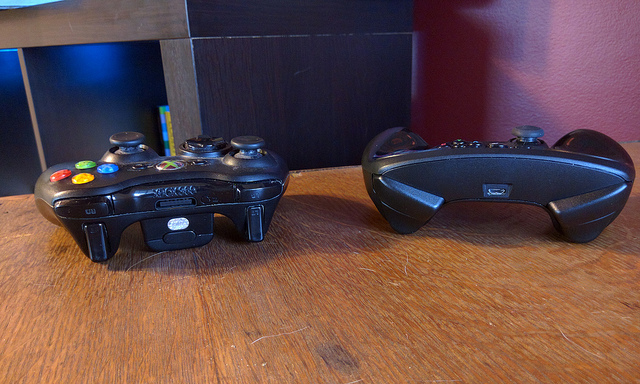
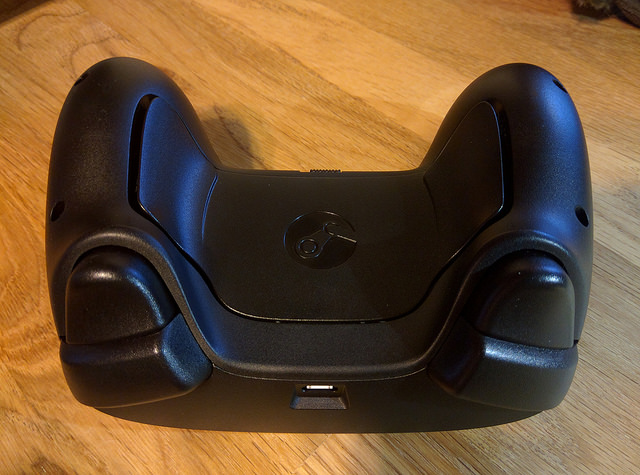
On the back, there's a pair of shoulder buttons and analog triggers that bottom
out in clicks like a GameCube controller. Along the handgrips lie two more wide buttons under the
middle & ring fingers. The plate for those buttons doubles as the battery
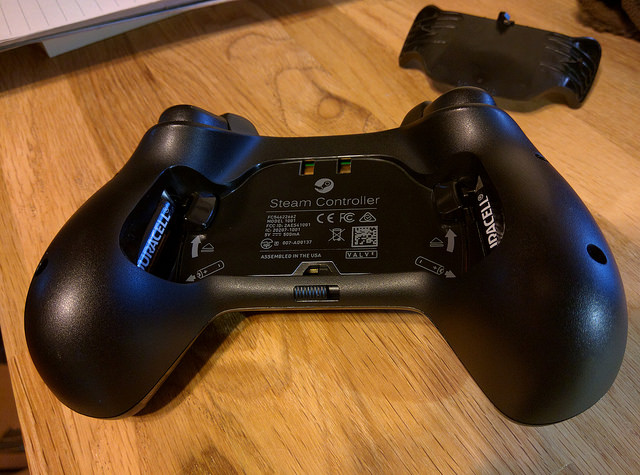
door, and one AA battery hides inside each of the handgrips.
[](https://www.flickr.com/photos/deusx/24727371301/in/dateposted/)
On the inside, there are gyro and accelerometer sensors to detect motion and
orientation of the controller.
If you want to see more of the innards,
consult the folks at [iFixit][]. They did [a great job of documenting their Steam
Controller teardown][teardown], saving me from feeling like I
should open mine up for the sake of this post.
(But, who am I kidding? I'll open it up at some point, because that's
what I do with all my toys.)
As for power, the controller can run tethered via a micro-USB cable, or
wirelessly using an included a USB dongle and a pair of AA batteries.
You can use rechargeables,
but the controller itself does not charge them while plugged in. I'd like to
see Valve come up with a rechargeable pack at some point.
[teardown]: https://www.ifixit.com/Teardown/Steam+Controller+Teardown/52578
[ifixit]: https://www.ifixit.com/
## Software
The physical design and laundry list of sensors is vaguely interesting. But,
what really makes the [Steam Controller][] shine - and sometimes stink - is
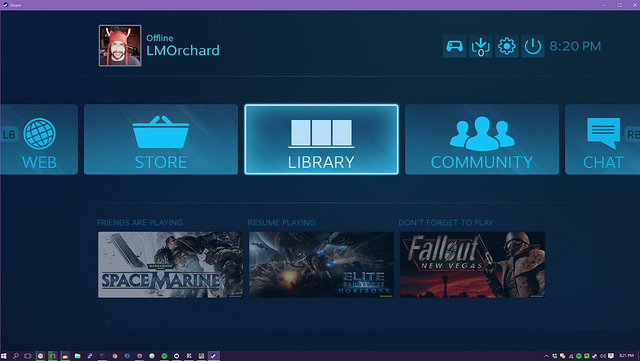
the software. And, that software is Steam in Big Picture Mode.
The only way to configure the Controller is via Big Picture mode.
And, as far as I can tell, launching games (even non-Steam games) via Big
Picture is the only way to load game-specific configurations.
I understand that this thing was designed to be paired with a Steam Machine
and played on a TV. But, I don't play in front of a TV - and I doubt many PC
gamers do. I find Big Picture Mode clunky and occasionally crashy. A few
times, the controller has gone non-responsive or got loaded with the wrong
configuration.
After [the firmware update in December][scdecpatch], my configuration changes
are often reverted & lost. Sometimes the Big Picture interface offers up
delays & progress animations with no explanation of what's happening. I'm
hoping I can troll the forums for some fixes, but having to do that is a bit
disappointing.
[scdecpatch]: http://store.steampowered.com/controller/update/dec15
It's early days yet, so things could get better with future patches. Valve
shows every indication that they plan to support this device for the long
haul. Still, I'd love it if Valve (or the community) released an "expert"
configuration tool as a straightforward desktop Windows application. Just let
me quickly assign bindings in a solid, ugly, utilitarian interface and let me
manually save & load configurations.
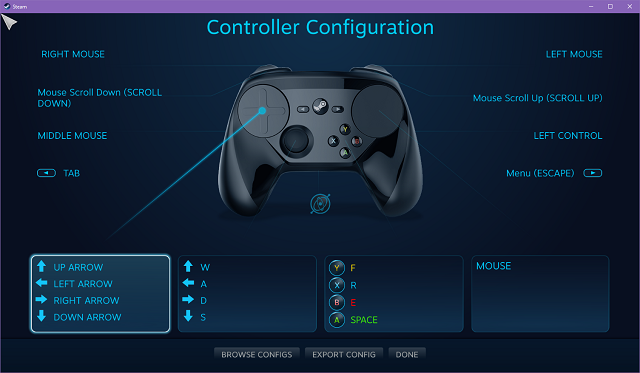
The awkwardness is frustrating, because configuration is the whole reason the
controller exists: I put up with the annoying UI because the result is
interesting. With a little tweaking, it really can generate whatever inputs are
needed for any game I want to play.
Except for the Valve button, there are 17 other buttons on the device available
to generate any combination of keyboard & mouse signals. That includes the
clicky trackpads & joystick - and I'm counting the analog triggers twice,
because you can set different inputs for both partial and full pulls.
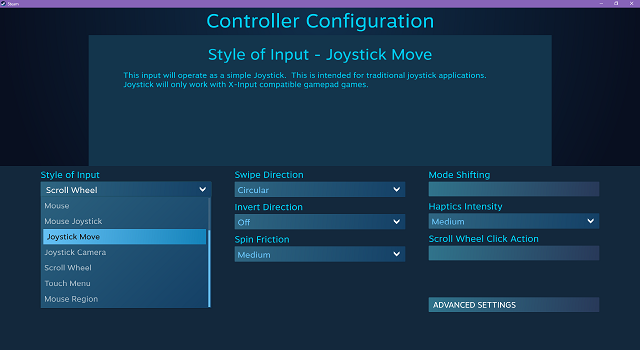
And then, there are the trackpads: In a nutshell, either trackpad can be
configured as a mouse, an analog joystick, a digital d-pad, a cluster of
buttons, or to summon up overlay menus triggering arbitrary inputs. There are 9
different modes covering slightly different simulations of these devices. Each
mode comes with its own control panel offering an array of sliders, variants,
and advanced settings.
For button input, there are ways to define segments of the trackpad as virtual
buttons activated on touch or by clicking down the pad. Joystick input comes
in a few subtly different flavors I haven't yet fully explored.
I've also not played much with touch menus. These consist of Steam-generated
overlays offering up to 16 buttons plus an alternate layer of 16 more.
Between both trackpads, this can add up to 64 different virtual buttons
triggering whatever keyboard, mouse, or gamepad combinations I'd like.
For pointer input, there's a mouse mode similar to a laptop trackpad, with
various acceleration and sensitivity settings. To my personal delight, there's
a trackball mode: the pad signals momentum through haptic rasping that
trails off after your thumb has lifted from a swipe - and it stops immediately
when your thumb returns to the pad.
You can also enable scroll wheel inputs via the raised outer edges of the
trackpads. It feels like to the old click-wheel iPods.
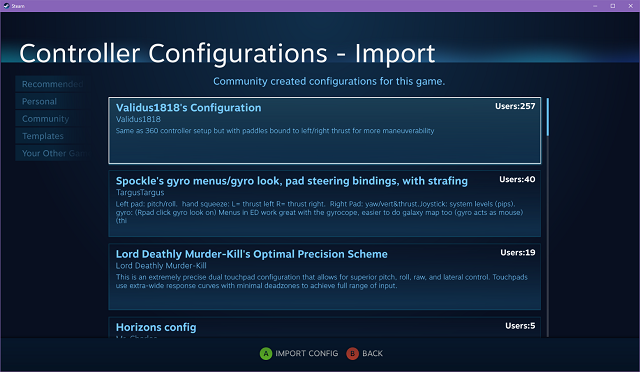
If all this sounds overwhelming, Steam offers ready-made crowdsourced
configurations. These are created by game developers, Valve, and shared by
the community at large. This means that I don't have to wait for all the
developers in the world to get around to supporting this particular weird
controller. Ideally, as time goes on, control schemes will arrive that hit a
sweet spot for every game.
Valve has certainly thrown a lot at the wall here. We'll see how much sticks.
It certainly scratches my itch for a fiddly input device, in any case.
## Compatibility
In a nutshell, if it accepts mouse, keyboard, joystick, or gamepad - the
[Steam Controller][] works. In this, the marketing is correct and it does what
it says on the tin. The more pressing issue is whether the Controller is
compatible with *me* as an interface to *the games I like*.
Of course, it should be noted that I'm by no means a pro gamer. I'm
the filthiest of casuals - whatever that means after playing video games avidly
for 30 years. I'm in it for fun, couldn't care less about being competitive.
I've had the most luck in mouse-and-keyboard games like the ponderously-paced
[Sunless Sea][] and even in the more frenetic [Diablo III][]. Of course, at
times, I lose track of the pointer in Diablo when I'm spazzing out with my
thumb and flinging it around between targets and running away to kite things.
That seems to get better as I turn down acceleration and play with
sensitivity. The newer Mouse Regions mode looks interesting, too, as it
provides a direct screen-to-trackpad map rather than mouse or trackball style
input.
For what it's worth, [I don't play a lot of MOBAs lately][mobatoxic], but I
can imagine the dynamics are similar to Diablo.
[mobatoxic]: http://kotaku.com/how-league-of-legends-enables-toxicity-1693572469
I also played a bit of [Team Fortress 2][tf2]. As promised, I was able to use
a trackpad for steering & coarse aiming and then tilt the controller itself to
refine my aim. Like many things with this device, it takes a bit of getting
used to and kind of turns it into a new game. Fun-ish, but I'm not great at it
yet.
[tf2]: http://store.steampowered.com/app/440/
[Rocket League][] worked out pretty well - in that I was equally terrible both
with the [Steam Controller][] and the Xbox 360 controller. I had a lot of fun
and never felt like I could blame the controller. Again, I'm just a filthy
casual.
I didn't have as much luck with [Laserlife][], a surreal rhythm game in the
tradition of Rez where you guide twin laser trails through targets with analog
sticks. Ideally, I should be able to use the two trackpads as analog sticks.
But, I did a lot better going back to the physical sticks on my Xbox 360
controller. I think the spring resistance in the physical joysticks helped cue
me into its position.
The issue seems similar to how I rarely get along with on-screen
controls in smartphone games. But, these trackpads have an advantage
over virtual glass joysticks - i.e. tactile cues like their surface curve,
raised edges, and the embossed d-pad shape. I'd like to see if I can find
workable settings, because twin-stick shooters are one of my favorite genres.
[Elite Dangerous][] offers a kind of bottomless pit of customization. It's a
work in progress translating my mouse-and-keyboard controls to a comfortable
scheme on the Controller. For example, it was stupid fun tying pitch and roll
to the motion sensors and flying the controller around like a model spaceship.
(I made zoomy-whoosh-pew-pew noises, too.) I've seen other control schemes use
the gyro for looking around the cockpit, which is actually used to summon up
various ship panels via gaze. This won't replace [a super-immersive HOTAS &
head tracking setup][eliteimmersive], but I think I can get it to an enjoyable
point.
[eliteimmersive]: https://www.youtube.com/watch?v=AvAI3l0v62E
[Sunless Sea]: http://www.failbettergames.com/sunless/
[Diablo III]: http://us.battle.net/d3/en/
[Laserlife]: http://store.steampowered.com/app/323040/
[Rocket League]: http://store.steampowered.com/app/252950/
[Elite Dangerous]: https://www.elitedangerous.com/
Overall, I've had decent luck with the games I play. Where things
haven't quite worked out, I have a hunch that there's a workable control
scheme somewhere inside the giant bag of options on offer. I've seen some
folks describe the process a bit like getting accustomed to a new keyboard
layout like Dvorak. That's oddly interesting to me, so I'm going to keep
poking at it.
## Hackability
The Controller is a USB HID composite device - in other words, It *is* a mouse
*and* a keyboard *and* a joystick *and* a gamepad, as far as USB is concerned.
I've gotten the sense that Steam does *something* with the Controller input,
but I'm not sure if it analgous to things like [JoyToKey][] or [AutoHotKey][]
to translate things on the PC side. My guess is that it leans most heavily on
processing in the controller itself to emit standard USB messages to
achieve maximum compatibility in games.
[JoyToKey]: http://joytokey.net/en/
[AutoHotKey]: https://autohotkey.com/
[](https://www.flickr.com/photos/deusx/24639522001/in/dateposted-public/)
Considering the things found in the [iFixit teardown][teardown],
I'm not seeing any particularly exotic parts. Valve stated early on that "[the
Steam Controller was designed from the ground up to be hackable][schackable]".
For example, from [a Reddit thread][reddit-chips], I
learned that the [Steam Controller][] is built around the [ARM
Cortex-M0][cortex-m0]. That's similar to the [ARM Cortex-M0+][cortex-m0-plus]
used in the [Teensy LC][teensylc].
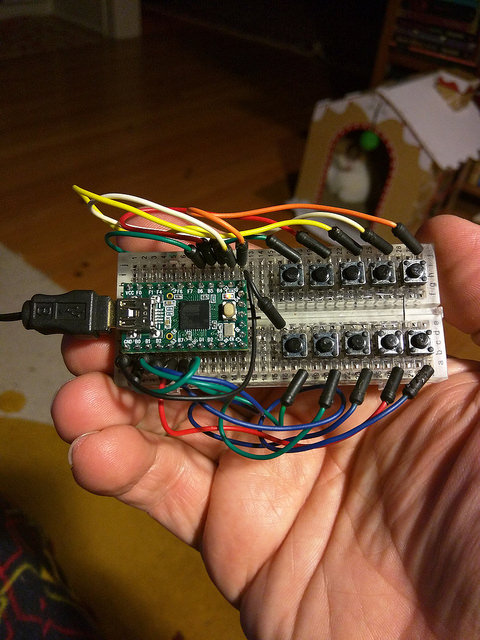
This is interesting, because I've been reading up on how to build a custom
keyboard. (You know, as one does.) In the course of that, I've been
acquainting myself with the [Teensy line of USB development boards][teensy].
Lately, I've been playing with the [Teensy 2.0][teensy20]. That seems to be
popular in the DIY community for how easy it makes implementing
USB devices. Granted, that's a different microcontroller (an [Atmel
ATmega32u4][ATmega32u4]), but I'm hoping that general experience with things like the
Teensy family of dev boards can eventually translate to some personal fun and
some community firmware to explore the potential of the [Steam Controller][].
As it is, someone's already figured out how to [play music through the haptic
actuators][hapticmusic] and they released the [source
code][hapticmusicsource]. That's more a function of decoding the
protocol from PC to Controller than messing around with the microcontrollers,
but it's still pretty cool.
It would be great if Valve released more docs & code around this thing. I
can understand that there might be some pressure to keep the Steam hardware &
software ecosystem cohesive. But, for a weird little device like this, I
imagine they'd only get more sales by fully opening everything up and letting
the tinkering world pave the way for more uses - and maybe fix a few bugs for
them as clever folks scratch their own itches.
[ATmega32u4]: http://www.atmel.com/devices/atmega32u4.aspx
[schackable]: http://hackaday.com/2013/10/01/steam-controller-open-and-hackable/
[teensylc]: https://www.pjrc.com/store/teensylc.html
[teensy]: https://www.pjrc.com/teensy/
[teensy20]: https://www.pjrc.com/store/teensy.html
[teardown]: https://www.ifixit.com/Teardown/Steam+Controller+Teardown/52578
[cortex-m0-plus]: http://www.arm.com/products/processors/cortex-m/cortex-m0plus.php
[cortex-m0]: http://www.arm.com/products/processors/cortex-m/cortex-m0.php
[reddit-chips]: https://www.reddit.com/r/SteamControllerMods/comments/3p6d26/some_details_on_the_chips_in_the_controller_and/
[hapticmusic]: https://steamcommunity.com/app/353370/discussions/0/494632506573267894/
[hapticmusicsource]: https://gitlab.com/Pilatomic/SteamControllerSinger
## Conclusion
The [Steam Controller][] is an odd little duck. It's a bit awkward to hold
and the software is not great. But, software can be fixed and the controls &
sensors onboard have so much great potential for PC gaming.
This is clearly not a mature, finished product - which is disappointing,
because I paid money for it - but I'm really rooting for it. And I've already
used it for dozens of hours in games, so it's obviously worked for me in many
capacities. I'm really hoping that Valve follows through on their promises to
open things up for tinkering - because it might be the thing that ultimately
redeems the whole project.
 ](https://www.flickr.com/photos/deusx/24726637531/in/dateposted/)
I've long been a fan of unusual input devices, the more fiddly the better.
It's been a little over 15 years since I last used a standard 104-key keyboard
on a PC, having been a [Happy Hacking Keyboard][hhkb] enthusiast ever since I
first [read about it in Linux Journal][hhkb-review].
[hhkb-review]: http://www.linuxjournal.com/article/3147
[hhkb]: http://amzn.to/1nQbo26
And, as the gaming world has invested in [increasingly complex gaming mice][gamingmice] over
the years, I've been solidly in the trackball camp since the late 1990's when
I played hours & hours of Quake 2 and Unreal Tournament.
[gamingmice]: http://icrontic.com/article/a4tech-v3-bloody-gun3-gaming-mouse-review
[
](https://www.flickr.com/photos/deusx/24726637531/in/dateposted/)
I've long been a fan of unusual input devices, the more fiddly the better.
It's been a little over 15 years since I last used a standard 104-key keyboard
on a PC, having been a [Happy Hacking Keyboard][hhkb] enthusiast ever since I
first [read about it in Linux Journal][hhkb-review].
[hhkb-review]: http://www.linuxjournal.com/article/3147
[hhkb]: http://amzn.to/1nQbo26
And, as the gaming world has invested in [increasingly complex gaming mice][gamingmice] over
the years, I've been solidly in the trackball camp since the late 1990's when
I played hours & hours of Quake 2 and Unreal Tournament.
[gamingmice]: http://icrontic.com/article/a4tech-v3-bloody-gun3-gaming-mouse-review
[ ](http://vgjunk.tumblr.com/post/63391681929/john-romero-wants-you-to-buy-a-mad-catz-panther-xl)
The [Mad Catz Panther XL][pantherxl] trackball-and-joystick combo
was my favorite for flight & space sims like Freespace. I used a [Microsoft
Sidewinder Strategic Commander][msssc] to play Everquest one-handed. (The
other hand was for tinkering with [ShowEQ][] on a nearby Linux machine, of course.)
[showeq]: https://github.com/brainiac/showeq
More recently, when I was playing a space trucker in EVE Online, I would often
ride a recumbent exercise bike and use a [One Finger Mouse][ofm] with my
laptop to align and warp between stations.
[msssc]: http://amzn.to/1nQby9D:
[pantherxl]: http://assassin3d.squarespace.com/history-panther-xl/
[ofm]: http://amzn.to/1NKn0bq
Given all the above, the [Steam Controller][] looked completely relevant to my
interests when [it was announced][scannounce] way back in 2013.
Fast forward to November 2015, and after many prototypes & tweaks, [it finally
arrived][screleased]. I managed to wait a month or so, watching for red flags
in early reviews. But, of course, I gave in and had it in time for my
traditional end-of-year holiday gaming binge.
](http://vgjunk.tumblr.com/post/63391681929/john-romero-wants-you-to-buy-a-mad-catz-panther-xl)
The [Mad Catz Panther XL][pantherxl] trackball-and-joystick combo
was my favorite for flight & space sims like Freespace. I used a [Microsoft
Sidewinder Strategic Commander][msssc] to play Everquest one-handed. (The
other hand was for tinkering with [ShowEQ][] on a nearby Linux machine, of course.)
[showeq]: https://github.com/brainiac/showeq
More recently, when I was playing a space trucker in EVE Online, I would often
ride a recumbent exercise bike and use a [One Finger Mouse][ofm] with my
laptop to align and warp between stations.
[msssc]: http://amzn.to/1nQby9D:
[pantherxl]: http://assassin3d.squarespace.com/history-panther-xl/
[ofm]: http://amzn.to/1NKn0bq
Given all the above, the [Steam Controller][] looked completely relevant to my
interests when [it was announced][scannounce] way back in 2013.
Fast forward to November 2015, and after many prototypes & tweaks, [it finally
arrived][screleased]. I managed to wait a month or so, watching for red flags
in early reviews. But, of course, I gave in and had it in time for my
traditional end-of-year holiday gaming binge. 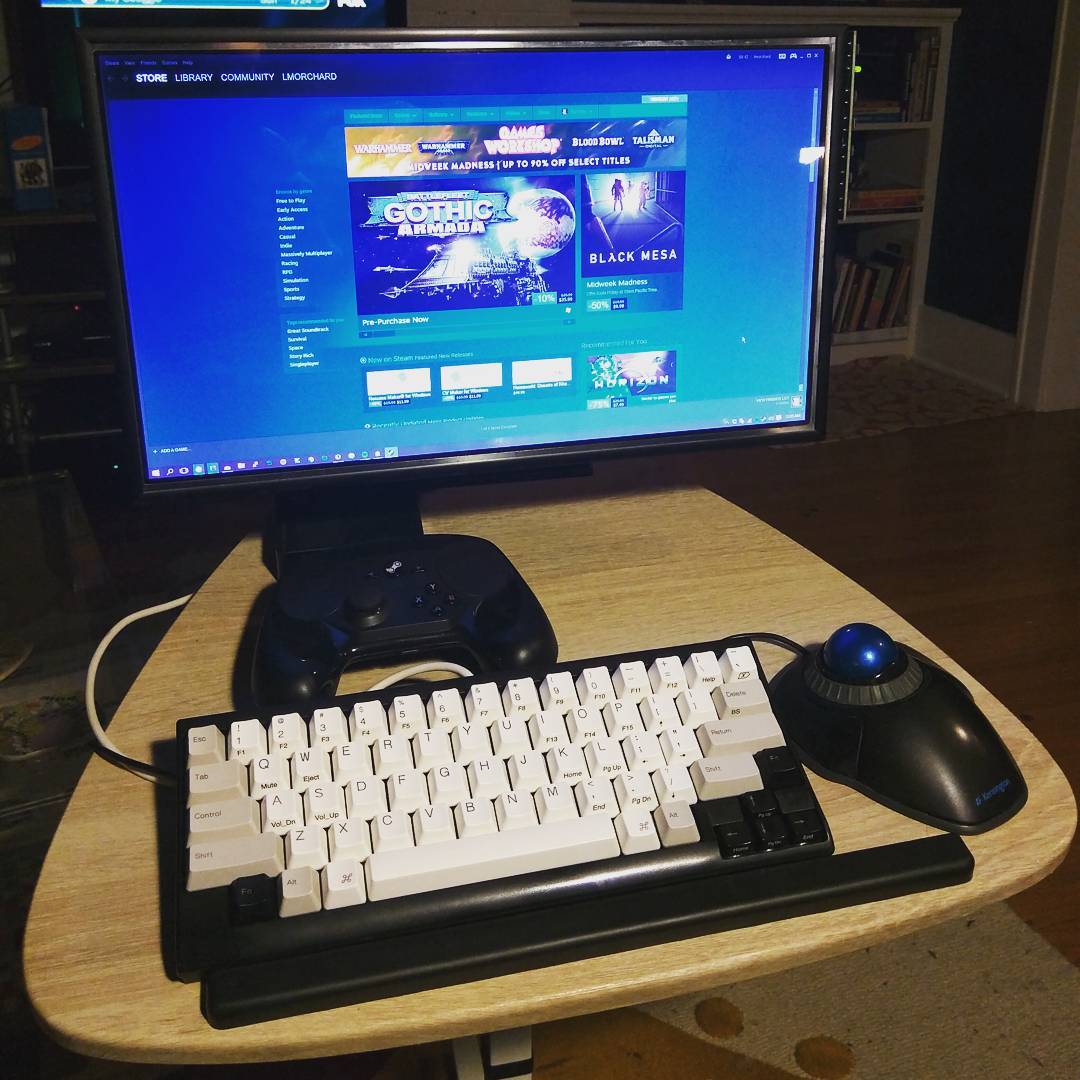 At [my couch PC][couchpc], I use an Xbox 360 controller whenever I can. I don't
want to clutter the living room with big weird joysticks & such.
[couchpc]: http://blog.lmorchard.com/2013/01/21/gaming-from-the-orchard-house-couch/
Besides that, having my hands in a neutral position in my lap seems to
help quite a lot with keeping wrist pain at bay after a day in my office
already spent with trackball and keyboard. But, not every game supports a
controller out of the box.
So, it seemed really promising when I read Valve's claims that the [Steam
Controller][] would work with "[games from all genres][steamhardware]"
including titles typically bound to a keyboard and mouse.
[steamhardware]: http://store.steampowered.com/app/353370/
[
At [my couch PC][couchpc], I use an Xbox 360 controller whenever I can. I don't
want to clutter the living room with big weird joysticks & such.
[couchpc]: http://blog.lmorchard.com/2013/01/21/gaming-from-the-orchard-house-couch/
Besides that, having my hands in a neutral position in my lap seems to
help quite a lot with keeping wrist pain at bay after a day in my office
already spent with trackball and keyboard. But, not every game supports a
controller out of the box.
So, it seemed really promising when I read Valve's claims that the [Steam
Controller][] would work with "[games from all genres][steamhardware]"
including titles typically bound to a keyboard and mouse.
[steamhardware]: http://store.steampowered.com/app/353370/
[ ](https://www.flickr.com/photos/deusx/24524584120)
Now that I've got the [Steam Controller][] in my hands, it makes my Xbox 360
controller feel tiny. It reminds me a little of the original Xbox controller.
Though, it's really unfair to take that comparison too far - I mean, that
thing was bigger than some actual game consoles.
The Xbox 360 handles taper down into rounded points that cover a third of my
palm. But, the [Steam Controller][] bulges out at the bottoms and covers about
half of my palm.
It's like the difference between a small chicken egg
and a jumbo. (Sorry, I've been cooking today.) And where my fingers curl
inward toward my palm with the 360 controller, the [Steam Controller][] has
them pointing more toward my chest to accomodate the thicker grips.
](https://www.flickr.com/photos/deusx/24524584120)
Now that I've got the [Steam Controller][] in my hands, it makes my Xbox 360
controller feel tiny. It reminds me a little of the original Xbox controller.
Though, it's really unfair to take that comparison too far - I mean, that
thing was bigger than some actual game consoles.
The Xbox 360 handles taper down into rounded points that cover a third of my
palm. But, the [Steam Controller][] bulges out at the bottoms and covers about
half of my palm.
It's like the difference between a small chicken egg
and a jumbo. (Sorry, I've been cooking today.) And where my fingers curl
inward toward my palm with the 360 controller, the [Steam Controller][] has
them pointing more toward my chest to accomodate the thicker grips.
 ](https://www.flickr.com/photos/deusx/24206620773/in/datetaken/)
[
](https://www.flickr.com/photos/deusx/24206620773/in/datetaken/)
[ ](https://www.flickr.com/photos/deusx/24740006121/in/datetaken/)
(And, this is where I realize I was never destined to be a [hand model][].)
[hand model]: https://www.youtube.com/watch?v=PZxX3-rJoNI
The Xbox 360 controller feels like curved handlebars between
my palms and the last three fingers, leaving just my index fingers and thumbs
free to move. It could be that I've gotten used to it over the years, but the
design of this controller feels like it naturally falls into my relaxed
hands after I've flopped them lazily into my lap.
The [Steam Controller][], though, seems to call for a more tense grip that I
can feel in my shoulders & wrists after awhile.
To keep things stable as I play, I find myself using some arm muscle & elbow
pressure to wedge it between the bony first knuckles of my index fingers and
the bases of my thumbs. Except for a little stabilization from my pinkies and
ring fingers, this leaves the rest of my fingers free to reach the thumbpads
and buttons.
](https://www.flickr.com/photos/deusx/24740006121/in/datetaken/)
(And, this is where I realize I was never destined to be a [hand model][].)
[hand model]: https://www.youtube.com/watch?v=PZxX3-rJoNI
The Xbox 360 controller feels like curved handlebars between
my palms and the last three fingers, leaving just my index fingers and thumbs
free to move. It could be that I've gotten used to it over the years, but the
design of this controller feels like it naturally falls into my relaxed
hands after I've flopped them lazily into my lap.
The [Steam Controller][], though, seems to call for a more tense grip that I
can feel in my shoulders & wrists after awhile.
To keep things stable as I play, I find myself using some arm muscle & elbow
pressure to wedge it between the bony first knuckles of my index fingers and
the bases of my thumbs. Except for a little stabilization from my pinkies and
ring fingers, this leaves the rest of my fingers free to reach the thumbpads
and buttons. 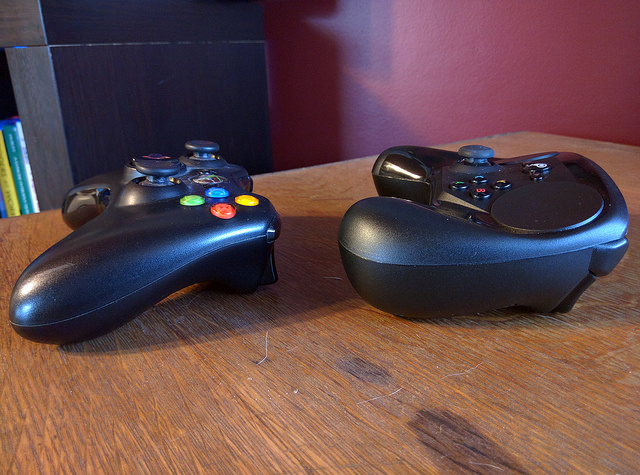 ](https://www.flickr.com/photos/deusx/24726646081/in/dateposted-public/)
[
](https://www.flickr.com/photos/deusx/24726646081/in/dateposted-public/)
[ ](https://www.flickr.com/photos/deusx/24702264542/in/dateposted-public/)
The face of the Xbox 360 controller follows a convex curve. When relaxed, my
extended thumbs arch over that curve, their pads resting on the left stick and
right button cluster.
The face of the [Steam Controller][] is concave, almost the inverse of the
other controller. My bent thumbs hover over a pair of circular trackpads,
which are far better controlled with strokes from thumb tips than by swiping or
rolling flat thumb pads across them.
[dpbone]: https://en.wikipedia.org/wiki/Phalanx_bone#Distal_phalanx
Overall, I can't say I'm entirely comfortable with the [Steam Controller][] in
my hands. That worries me a little after years of being unkind to my wrists.
I'm still adjusting my grip on the thing, though. Maybe I'll get used to it.
After all, I spent years with the first NES gamepad - and it was no ergonomic
marvel.
](https://www.flickr.com/photos/deusx/24702264542/in/dateposted-public/)
The face of the Xbox 360 controller follows a convex curve. When relaxed, my
extended thumbs arch over that curve, their pads resting on the left stick and
right button cluster.
The face of the [Steam Controller][] is concave, almost the inverse of the
other controller. My bent thumbs hover over a pair of circular trackpads,
which are far better controlled with strokes from thumb tips than by swiping or
rolling flat thumb pads across them.
[dpbone]: https://en.wikipedia.org/wiki/Phalanx_bone#Distal_phalanx
Overall, I can't say I'm entirely comfortable with the [Steam Controller][] in
my hands. That worries me a little after years of being unkind to my wrists.
I'm still adjusting my grip on the thing, though. Maybe I'll get used to it.
After all, I spent years with the first NES gamepad - and it was no ergonomic
marvel.
 ](https://www.flickr.com/photos/deusx/24525157630/in/photostream/)
On the front, there's the "Valve" button flanked by a back & start buttons.
There's also an analog clicky joystick and an X/Y/A/B button cluster.
But, the [Steam Controller][]'s special sauce is the pair of trackpads at the
top of the controller. More detail about those when I get to writing about the
software.
Beneath these trackpads are the [linear resonant actuators][lra] used for haptic
feedback. Interestingly, I haven't found any games that can use these haptic actuators
to generate in-game vibration. They seem limited to haptics for controller
modes, so far.
[lra]: http://www.precisionmicrodrives.com/vibrating-vibrator-vibration-motors/linear-resonant-actuator-lra-haptic-vibration-motors
[
](https://www.flickr.com/photos/deusx/24525157630/in/photostream/)
On the front, there's the "Valve" button flanked by a back & start buttons.
There's also an analog clicky joystick and an X/Y/A/B button cluster.
But, the [Steam Controller][]'s special sauce is the pair of trackpads at the
top of the controller. More detail about those when I get to writing about the
software.
Beneath these trackpads are the [linear resonant actuators][lra] used for haptic
feedback. Interestingly, I haven't found any games that can use these haptic actuators
to generate in-game vibration. They seem limited to haptics for controller
modes, so far.
[lra]: http://www.precisionmicrodrives.com/vibrating-vibrator-vibration-motors/linear-resonant-actuator-lra-haptic-vibration-motors
[ ](https://www.flickr.com/photos/deusx/24820691505/in/dateposted/)
On the back, there's a pair of shoulder buttons and analog triggers that bottom
out in clicks like a GameCube controller. Along the handgrips lie two more wide buttons under the
middle & ring fingers. The plate for those buttons doubles as the battery
door, and one AA battery hides inside each of the handgrips.
[
](https://www.flickr.com/photos/deusx/24820691505/in/dateposted/)
On the back, there's a pair of shoulder buttons and analog triggers that bottom
out in clicks like a GameCube controller. Along the handgrips lie two more wide buttons under the
middle & ring fingers. The plate for those buttons doubles as the battery
door, and one AA battery hides inside each of the handgrips.
[ ](https://www.flickr.com/photos/deusx/24727371301/in/dateposted/)
On the inside, there are gyro and accelerometer sensors to detect motion and
orientation of the controller.
If you want to see more of the innards,
consult the folks at [iFixit][]. They did [a great job of documenting their Steam
Controller teardown][teardown], saving me from feeling like I
should open mine up for the sake of this post.
(But, who am I kidding? I'll open it up at some point, because that's
what I do with all my toys.)
As for power, the controller can run tethered via a micro-USB cable, or
wirelessly using an included a USB dongle and a pair of AA batteries.
You can use rechargeables,
but the controller itself does not charge them while plugged in. I'd like to
see Valve come up with a rechargeable pack at some point.
](https://www.flickr.com/photos/deusx/24727371301/in/dateposted/)
On the inside, there are gyro and accelerometer sensors to detect motion and
orientation of the controller.
If you want to see more of the innards,
consult the folks at [iFixit][]. They did [a great job of documenting their Steam
Controller teardown][teardown], saving me from feeling like I
should open mine up for the sake of this post.
(But, who am I kidding? I'll open it up at some point, because that's
what I do with all my toys.)
As for power, the controller can run tethered via a micro-USB cable, or
wirelessly using an included a USB dongle and a pair of AA batteries.
You can use rechargeables,
but the controller itself does not charge them while plugged in. I'd like to
see Valve come up with a rechargeable pack at some point.
 The only way to configure the Controller is via Big Picture mode.
And, as far as I can tell, launching games (even non-Steam games) via Big
Picture is the only way to load game-specific configurations.
I understand that this thing was designed to be paired with a Steam Machine
and played on a TV. But, I don't play in front of a TV - and I doubt many PC
gamers do. I find Big Picture Mode clunky and occasionally crashy. A few
times, the controller has gone non-responsive or got loaded with the wrong
configuration.
After [the firmware update in December][scdecpatch], my configuration changes
are often reverted & lost. Sometimes the Big Picture interface offers up
delays & progress animations with no explanation of what's happening. I'm
hoping I can troll the forums for some fixes, but having to do that is a bit
disappointing.
[scdecpatch]: http://store.steampowered.com/controller/update/dec15
It's early days yet, so things could get better with future patches. Valve
shows every indication that they plan to support this device for the long
haul. Still, I'd love it if Valve (or the community) released an "expert"
configuration tool as a straightforward desktop Windows application. Just let
me quickly assign bindings in a solid, ugly, utilitarian interface and let me
manually save & load configurations.
The only way to configure the Controller is via Big Picture mode.
And, as far as I can tell, launching games (even non-Steam games) via Big
Picture is the only way to load game-specific configurations.
I understand that this thing was designed to be paired with a Steam Machine
and played on a TV. But, I don't play in front of a TV - and I doubt many PC
gamers do. I find Big Picture Mode clunky and occasionally crashy. A few
times, the controller has gone non-responsive or got loaded with the wrong
configuration.
After [the firmware update in December][scdecpatch], my configuration changes
are often reverted & lost. Sometimes the Big Picture interface offers up
delays & progress animations with no explanation of what's happening. I'm
hoping I can troll the forums for some fixes, but having to do that is a bit
disappointing.
[scdecpatch]: http://store.steampowered.com/controller/update/dec15
It's early days yet, so things could get better with future patches. Valve
shows every indication that they plan to support this device for the long
haul. Still, I'd love it if Valve (or the community) released an "expert"
configuration tool as a straightforward desktop Windows application. Just let
me quickly assign bindings in a solid, ugly, utilitarian interface and let me
manually save & load configurations.
 The awkwardness is frustrating, because configuration is the whole reason the
controller exists: I put up with the annoying UI because the result is
interesting. With a little tweaking, it really can generate whatever inputs are
needed for any game I want to play.
Except for the Valve button, there are 17 other buttons on the device available
to generate any combination of keyboard & mouse signals. That includes the
clicky trackpads & joystick - and I'm counting the analog triggers twice,
because you can set different inputs for both partial and full pulls.
The awkwardness is frustrating, because configuration is the whole reason the
controller exists: I put up with the annoying UI because the result is
interesting. With a little tweaking, it really can generate whatever inputs are
needed for any game I want to play.
Except for the Valve button, there are 17 other buttons on the device available
to generate any combination of keyboard & mouse signals. That includes the
clicky trackpads & joystick - and I'm counting the analog triggers twice,
because you can set different inputs for both partial and full pulls.
 And then, there are the trackpads: In a nutshell, either trackpad can be
configured as a mouse, an analog joystick, a digital d-pad, a cluster of
buttons, or to summon up overlay menus triggering arbitrary inputs. There are 9
different modes covering slightly different simulations of these devices. Each
mode comes with its own control panel offering an array of sliders, variants,
and advanced settings.
For button input, there are ways to define segments of the trackpad as virtual
buttons activated on touch or by clicking down the pad. Joystick input comes
in a few subtly different flavors I haven't yet fully explored.
I've also not played much with touch menus. These consist of Steam-generated
overlays offering up to 16 buttons plus an alternate layer of 16 more.
Between both trackpads, this can add up to 64 different virtual buttons
triggering whatever keyboard, mouse, or gamepad combinations I'd like.
For pointer input, there's a mouse mode similar to a laptop trackpad, with
various acceleration and sensitivity settings. To my personal delight, there's
a trackball mode: the pad signals momentum through haptic rasping that
trails off after your thumb has lifted from a swipe - and it stops immediately
when your thumb returns to the pad.
You can also enable scroll wheel inputs via the raised outer edges of the
trackpads. It feels like to the old click-wheel iPods.
And then, there are the trackpads: In a nutshell, either trackpad can be
configured as a mouse, an analog joystick, a digital d-pad, a cluster of
buttons, or to summon up overlay menus triggering arbitrary inputs. There are 9
different modes covering slightly different simulations of these devices. Each
mode comes with its own control panel offering an array of sliders, variants,
and advanced settings.
For button input, there are ways to define segments of the trackpad as virtual
buttons activated on touch or by clicking down the pad. Joystick input comes
in a few subtly different flavors I haven't yet fully explored.
I've also not played much with touch menus. These consist of Steam-generated
overlays offering up to 16 buttons plus an alternate layer of 16 more.
Between both trackpads, this can add up to 64 different virtual buttons
triggering whatever keyboard, mouse, or gamepad combinations I'd like.
For pointer input, there's a mouse mode similar to a laptop trackpad, with
various acceleration and sensitivity settings. To my personal delight, there's
a trackball mode: the pad signals momentum through haptic rasping that
trails off after your thumb has lifted from a swipe - and it stops immediately
when your thumb returns to the pad.
You can also enable scroll wheel inputs via the raised outer edges of the
trackpads. It feels like to the old click-wheel iPods.
 If all this sounds overwhelming, Steam offers ready-made crowdsourced
configurations. These are created by game developers, Valve, and shared by
the community at large. This means that I don't have to wait for all the
developers in the world to get around to supporting this particular weird
controller. Ideally, as time goes on, control schemes will arrive that hit a
sweet spot for every game.
Valve has certainly thrown a lot at the wall here. We'll see how much sticks.
It certainly scratches my itch for a fiddly input device, in any case.
## Compatibility
In a nutshell, if it accepts mouse, keyboard, joystick, or gamepad - the
[Steam Controller][] works. In this, the marketing is correct and it does what
it says on the tin. The more pressing issue is whether the Controller is
compatible with *me* as an interface to *the games I like*.
Of course, it should be noted that I'm by no means a pro gamer. I'm
the filthiest of casuals - whatever that means after playing video games avidly
for 30 years. I'm in it for fun, couldn't care less about being competitive.
I've had the most luck in mouse-and-keyboard games like the ponderously-paced
[Sunless Sea][] and even in the more frenetic [Diablo III][]. Of course, at
times, I lose track of the pointer in Diablo when I'm spazzing out with my
thumb and flinging it around between targets and running away to kite things.
That seems to get better as I turn down acceleration and play with
sensitivity. The newer Mouse Regions mode looks interesting, too, as it
provides a direct screen-to-trackpad map rather than mouse or trackball style
input.
For what it's worth, [I don't play a lot of MOBAs lately][mobatoxic], but I
can imagine the dynamics are similar to Diablo.
[mobatoxic]: http://kotaku.com/how-league-of-legends-enables-toxicity-1693572469
I also played a bit of [Team Fortress 2][tf2]. As promised, I was able to use
a trackpad for steering & coarse aiming and then tilt the controller itself to
refine my aim. Like many things with this device, it takes a bit of getting
used to and kind of turns it into a new game. Fun-ish, but I'm not great at it
yet.
[tf2]: http://store.steampowered.com/app/440/
[Rocket League][] worked out pretty well - in that I was equally terrible both
with the [Steam Controller][] and the Xbox 360 controller. I had a lot of fun
and never felt like I could blame the controller. Again, I'm just a filthy
casual.
I didn't have as much luck with [Laserlife][], a surreal rhythm game in the
tradition of Rez where you guide twin laser trails through targets with analog
sticks. Ideally, I should be able to use the two trackpads as analog sticks.
But, I did a lot better going back to the physical sticks on my Xbox 360
controller. I think the spring resistance in the physical joysticks helped cue
me into its position.
The issue seems similar to how I rarely get along with on-screen
controls in smartphone games. But, these trackpads have an advantage
over virtual glass joysticks - i.e. tactile cues like their surface curve,
raised edges, and the embossed d-pad shape. I'd like to see if I can find
workable settings, because twin-stick shooters are one of my favorite genres.
[Elite Dangerous][] offers a kind of bottomless pit of customization. It's a
work in progress translating my mouse-and-keyboard controls to a comfortable
scheme on the Controller. For example, it was stupid fun tying pitch and roll
to the motion sensors and flying the controller around like a model spaceship.
(I made zoomy-whoosh-pew-pew noises, too.) I've seen other control schemes use
the gyro for looking around the cockpit, which is actually used to summon up
various ship panels via gaze. This won't replace [a super-immersive HOTAS &
head tracking setup][eliteimmersive], but I think I can get it to an enjoyable
point.
[eliteimmersive]: https://www.youtube.com/watch?v=AvAI3l0v62E
[Sunless Sea]: http://www.failbettergames.com/sunless/
[Diablo III]: http://us.battle.net/d3/en/
[Laserlife]: http://store.steampowered.com/app/323040/
[Rocket League]: http://store.steampowered.com/app/252950/
[Elite Dangerous]: https://www.elitedangerous.com/
Overall, I've had decent luck with the games I play. Where things
haven't quite worked out, I have a hunch that there's a workable control
scheme somewhere inside the giant bag of options on offer. I've seen some
folks describe the process a bit like getting accustomed to a new keyboard
layout like Dvorak. That's oddly interesting to me, so I'm going to keep
poking at it.
## Hackability
The Controller is a USB HID composite device - in other words, It *is* a mouse
*and* a keyboard *and* a joystick *and* a gamepad, as far as USB is concerned.
I've gotten the sense that Steam does *something* with the Controller input,
but I'm not sure if it analgous to things like [JoyToKey][] or [AutoHotKey][]
to translate things on the PC side. My guess is that it leans most heavily on
processing in the controller itself to emit standard USB messages to
achieve maximum compatibility in games.
[JoyToKey]: http://joytokey.net/en/
[AutoHotKey]: https://autohotkey.com/
[
If all this sounds overwhelming, Steam offers ready-made crowdsourced
configurations. These are created by game developers, Valve, and shared by
the community at large. This means that I don't have to wait for all the
developers in the world to get around to supporting this particular weird
controller. Ideally, as time goes on, control schemes will arrive that hit a
sweet spot for every game.
Valve has certainly thrown a lot at the wall here. We'll see how much sticks.
It certainly scratches my itch for a fiddly input device, in any case.
## Compatibility
In a nutshell, if it accepts mouse, keyboard, joystick, or gamepad - the
[Steam Controller][] works. In this, the marketing is correct and it does what
it says on the tin. The more pressing issue is whether the Controller is
compatible with *me* as an interface to *the games I like*.
Of course, it should be noted that I'm by no means a pro gamer. I'm
the filthiest of casuals - whatever that means after playing video games avidly
for 30 years. I'm in it for fun, couldn't care less about being competitive.
I've had the most luck in mouse-and-keyboard games like the ponderously-paced
[Sunless Sea][] and even in the more frenetic [Diablo III][]. Of course, at
times, I lose track of the pointer in Diablo when I'm spazzing out with my
thumb and flinging it around between targets and running away to kite things.
That seems to get better as I turn down acceleration and play with
sensitivity. The newer Mouse Regions mode looks interesting, too, as it
provides a direct screen-to-trackpad map rather than mouse or trackball style
input.
For what it's worth, [I don't play a lot of MOBAs lately][mobatoxic], but I
can imagine the dynamics are similar to Diablo.
[mobatoxic]: http://kotaku.com/how-league-of-legends-enables-toxicity-1693572469
I also played a bit of [Team Fortress 2][tf2]. As promised, I was able to use
a trackpad for steering & coarse aiming and then tilt the controller itself to
refine my aim. Like many things with this device, it takes a bit of getting
used to and kind of turns it into a new game. Fun-ish, but I'm not great at it
yet.
[tf2]: http://store.steampowered.com/app/440/
[Rocket League][] worked out pretty well - in that I was equally terrible both
with the [Steam Controller][] and the Xbox 360 controller. I had a lot of fun
and never felt like I could blame the controller. Again, I'm just a filthy
casual.
I didn't have as much luck with [Laserlife][], a surreal rhythm game in the
tradition of Rez where you guide twin laser trails through targets with analog
sticks. Ideally, I should be able to use the two trackpads as analog sticks.
But, I did a lot better going back to the physical sticks on my Xbox 360
controller. I think the spring resistance in the physical joysticks helped cue
me into its position.
The issue seems similar to how I rarely get along with on-screen
controls in smartphone games. But, these trackpads have an advantage
over virtual glass joysticks - i.e. tactile cues like their surface curve,
raised edges, and the embossed d-pad shape. I'd like to see if I can find
workable settings, because twin-stick shooters are one of my favorite genres.
[Elite Dangerous][] offers a kind of bottomless pit of customization. It's a
work in progress translating my mouse-and-keyboard controls to a comfortable
scheme on the Controller. For example, it was stupid fun tying pitch and roll
to the motion sensors and flying the controller around like a model spaceship.
(I made zoomy-whoosh-pew-pew noises, too.) I've seen other control schemes use
the gyro for looking around the cockpit, which is actually used to summon up
various ship panels via gaze. This won't replace [a super-immersive HOTAS &
head tracking setup][eliteimmersive], but I think I can get it to an enjoyable
point.
[eliteimmersive]: https://www.youtube.com/watch?v=AvAI3l0v62E
[Sunless Sea]: http://www.failbettergames.com/sunless/
[Diablo III]: http://us.battle.net/d3/en/
[Laserlife]: http://store.steampowered.com/app/323040/
[Rocket League]: http://store.steampowered.com/app/252950/
[Elite Dangerous]: https://www.elitedangerous.com/
Overall, I've had decent luck with the games I play. Where things
haven't quite worked out, I have a hunch that there's a workable control
scheme somewhere inside the giant bag of options on offer. I've seen some
folks describe the process a bit like getting accustomed to a new keyboard
layout like Dvorak. That's oddly interesting to me, so I'm going to keep
poking at it.
## Hackability
The Controller is a USB HID composite device - in other words, It *is* a mouse
*and* a keyboard *and* a joystick *and* a gamepad, as far as USB is concerned.
I've gotten the sense that Steam does *something* with the Controller input,
but I'm not sure if it analgous to things like [JoyToKey][] or [AutoHotKey][]
to translate things on the PC side. My guess is that it leans most heavily on
processing in the controller itself to emit standard USB messages to
achieve maximum compatibility in games.
[JoyToKey]: http://joytokey.net/en/
[AutoHotKey]: https://autohotkey.com/
[ ](https://www.flickr.com/photos/deusx/24639522001/in/dateposted-public/)
Considering the things found in the [iFixit teardown][teardown],
I'm not seeing any particularly exotic parts. Valve stated early on that "[the
Steam Controller was designed from the ground up to be hackable][schackable]".
For example, from [a Reddit thread][reddit-chips], I
learned that the [Steam Controller][] is built around the [ARM
Cortex-M0][cortex-m0]. That's similar to the [ARM Cortex-M0+][cortex-m0-plus]
used in the [Teensy LC][teensylc].
This is interesting, because I've been reading up on how to build a custom
keyboard. (You know, as one does.) In the course of that, I've been
acquainting myself with the [Teensy line of USB development boards][teensy].
Lately, I've been playing with the [Teensy 2.0][teensy20]. That seems to be
popular in the DIY community for how easy it makes implementing
USB devices. Granted, that's a different microcontroller (an [Atmel
ATmega32u4][ATmega32u4]), but I'm hoping that general experience with things like the
Teensy family of dev boards can eventually translate to some personal fun and
some community firmware to explore the potential of the [Steam Controller][].
As it is, someone's already figured out how to [play music through the haptic
actuators][hapticmusic] and they released the [source
code][hapticmusicsource]. That's more a function of decoding the
protocol from PC to Controller than messing around with the microcontrollers,
but it's still pretty cool.
It would be great if Valve released more docs & code around this thing. I
can understand that there might be some pressure to keep the Steam hardware &
software ecosystem cohesive. But, for a weird little device like this, I
imagine they'd only get more sales by fully opening everything up and letting
the tinkering world pave the way for more uses - and maybe fix a few bugs for
them as clever folks scratch their own itches.
[ATmega32u4]: http://www.atmel.com/devices/atmega32u4.aspx
[schackable]: http://hackaday.com/2013/10/01/steam-controller-open-and-hackable/
[teensylc]: https://www.pjrc.com/store/teensylc.html
[teensy]: https://www.pjrc.com/teensy/
[teensy20]: https://www.pjrc.com/store/teensy.html
[teardown]: https://www.ifixit.com/Teardown/Steam+Controller+Teardown/52578
[cortex-m0-plus]: http://www.arm.com/products/processors/cortex-m/cortex-m0plus.php
[cortex-m0]: http://www.arm.com/products/processors/cortex-m/cortex-m0.php
[reddit-chips]: https://www.reddit.com/r/SteamControllerMods/comments/3p6d26/some_details_on_the_chips_in_the_controller_and/
[hapticmusic]: https://steamcommunity.com/app/353370/discussions/0/494632506573267894/
[hapticmusicsource]: https://gitlab.com/Pilatomic/SteamControllerSinger
## Conclusion
The [Steam Controller][] is an odd little duck. It's a bit awkward to hold
and the software is not great. But, software can be fixed and the controls &
sensors onboard have so much great potential for PC gaming.
This is clearly not a mature, finished product - which is disappointing,
because I paid money for it - but I'm really rooting for it. And I've already
used it for dozens of hours in games, so it's obviously worked for me in many
capacities. I'm really hoping that Valve follows through on their promises to
open things up for tinkering - because it might be the thing that ultimately
redeems the whole project.
](https://www.flickr.com/photos/deusx/24639522001/in/dateposted-public/)
Considering the things found in the [iFixit teardown][teardown],
I'm not seeing any particularly exotic parts. Valve stated early on that "[the
Steam Controller was designed from the ground up to be hackable][schackable]".
For example, from [a Reddit thread][reddit-chips], I
learned that the [Steam Controller][] is built around the [ARM
Cortex-M0][cortex-m0]. That's similar to the [ARM Cortex-M0+][cortex-m0-plus]
used in the [Teensy LC][teensylc].
This is interesting, because I've been reading up on how to build a custom
keyboard. (You know, as one does.) In the course of that, I've been
acquainting myself with the [Teensy line of USB development boards][teensy].
Lately, I've been playing with the [Teensy 2.0][teensy20]. That seems to be
popular in the DIY community for how easy it makes implementing
USB devices. Granted, that's a different microcontroller (an [Atmel
ATmega32u4][ATmega32u4]), but I'm hoping that general experience with things like the
Teensy family of dev boards can eventually translate to some personal fun and
some community firmware to explore the potential of the [Steam Controller][].
As it is, someone's already figured out how to [play music through the haptic
actuators][hapticmusic] and they released the [source
code][hapticmusicsource]. That's more a function of decoding the
protocol from PC to Controller than messing around with the microcontrollers,
but it's still pretty cool.
It would be great if Valve released more docs & code around this thing. I
can understand that there might be some pressure to keep the Steam hardware &
software ecosystem cohesive. But, for a weird little device like this, I
imagine they'd only get more sales by fully opening everything up and letting
the tinkering world pave the way for more uses - and maybe fix a few bugs for
them as clever folks scratch their own itches.
[ATmega32u4]: http://www.atmel.com/devices/atmega32u4.aspx
[schackable]: http://hackaday.com/2013/10/01/steam-controller-open-and-hackable/
[teensylc]: https://www.pjrc.com/store/teensylc.html
[teensy]: https://www.pjrc.com/teensy/
[teensy20]: https://www.pjrc.com/store/teensy.html
[teardown]: https://www.ifixit.com/Teardown/Steam+Controller+Teardown/52578
[cortex-m0-plus]: http://www.arm.com/products/processors/cortex-m/cortex-m0plus.php
[cortex-m0]: http://www.arm.com/products/processors/cortex-m/cortex-m0.php
[reddit-chips]: https://www.reddit.com/r/SteamControllerMods/comments/3p6d26/some_details_on_the_chips_in_the_controller_and/
[hapticmusic]: https://steamcommunity.com/app/353370/discussions/0/494632506573267894/
[hapticmusicsource]: https://gitlab.com/Pilatomic/SteamControllerSinger
## Conclusion
The [Steam Controller][] is an odd little duck. It's a bit awkward to hold
and the software is not great. But, software can be fixed and the controls &
sensors onboard have so much great potential for PC gaming.
This is clearly not a mature, finished product - which is disappointing,
because I paid money for it - but I'm really rooting for it. And I've already
used it for dozens of hours in games, so it's obviously worked for me in many
capacities. I'm really hoping that Valve follows through on their promises to
open things up for tinkering - because it might be the thing that ultimately
redeems the whole project.