---
title: "Adding Android to a multi-platform React app"
date: 2015-09-21T12:00:00-07:00
url: https://blog.lmorchard.com/2015/09/21/react-native-android/
author: Les Orchard
tags: [webdev, native, react, reactnative, android, ios, mobile, mozilla]
---
# Adding Android to a multi-platform React app
TL;DR: A couple of months back, [I wrote about a TODO app built using React
for web and React Native for iOS][rnpart1].
Last week, the team at Facebook
[released React Native for Android][rnandroid]. So, I circled back to add
Android support and revisit how code sharing looks now.
[rnandroid]: https://code.facebook.com/posts/1189117404435352/
[rnpart1]: http://blog.lmorchard.com/2015/07/22/react-multiplatform/
[reactmultiplatform]: https://github.com/lmorchard/react-multiplatform
## Getting up to speed
With this [new release of React Native][rnandroid], I was able to add support
for Android to [my little TODO app][reactmultiplatform].
The first task was to [shuffle directories & files around and add the base
Android support][c1]. In general, the project layout is now cleaner.
Assets for each platform now live in separate sub-directories.
[c1]: https://github.com/lmorchard/react-multiplatform/commit/38fb7afe67f8c339b8d51c69a1f515a5a91e97c7
Next, to start iterating & experimenting, I copied the code from the iOS app
into Android-specific directories. I [only needed to make some small
tweaks][c2] to account for differences in native component sets. That got my
base app functionality working.
[c2]: https://github.com/lmorchard/react-multiplatform/commit/fd80e9859400744ac5fcffc8f7d75d6703a3856d
Then, [I squashed the iOS & Android models together][c3] when I realized that
code was identical between the React Native platforms. That could change in
the future, but there's no need for a difference right now.
[c3]: https://github.com/lmorchard/react-multiplatform/commit/dd8b6b307c31b67fde23c6b090e7b1f1d8b0f579
After sleeping on it, [I refactored some common mixins][c4] to take advantage of
additional sharing opportunities I found between iOS & Android views. That
helped to further shrink the lines of duplicated code.
[c4]: https://github.com/lmorchard/react-multiplatform/commit/ea7abb421b7e0486b2d3de42001724343f832901
This added what amounts to a new category of code sharing in my project. So,
[I separated that code into its own module][c5] to make the distinction easier
to see & measure. Now, I have code shared between web and native in general,
and code shared between the iOS and Android native platforms.
[c5]: https://github.com/lmorchard/react-multiplatform/commit/cdbbff72cb941fac75f68c1c91279fa780997b26
Finally, in an attempt to start automating my code metrics, [I added
`loc-metrics.sh`][c6].
[c6]: https://github.com/lmorchard/react-multiplatform/commit/d5149768e116571d0a1a059d1ff16e1cfc45fcfd
## Visualizing the code metrics
So, I tried drawing some Venn diagrams in my notebook. But, I'm terrible at
drawing. That's when I remembered that SVG is a thing where I can draw by
writing code. So, [I spent an afternoon teaching myself some SVG][svgtutorial]
and [reworked my metrics shell script][c7].
[c7]: https://github.com/lmorchard/react-multiplatform/commit/0014232c9858e082414e094be021170fda19aab0
[svgtutorial]: https://developer.mozilla.org/en-US/docs/Web/SVG/Tutorial
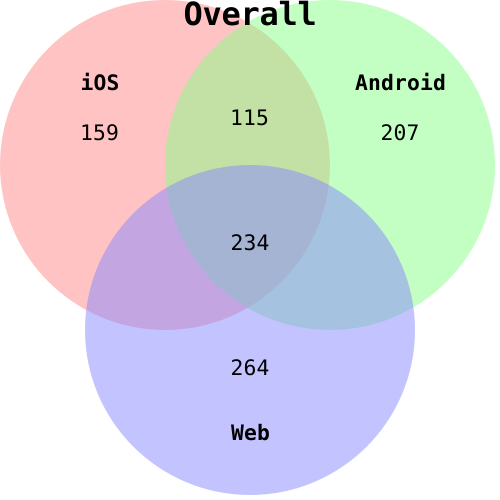
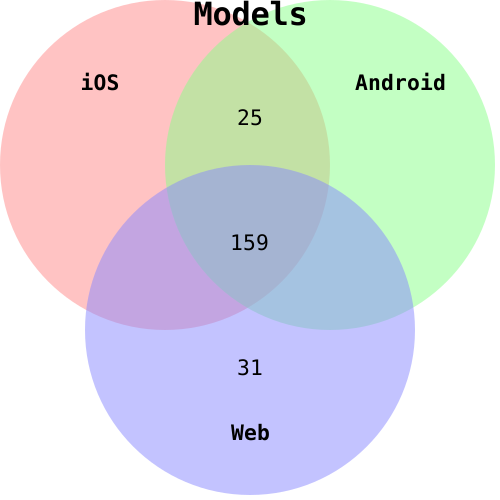
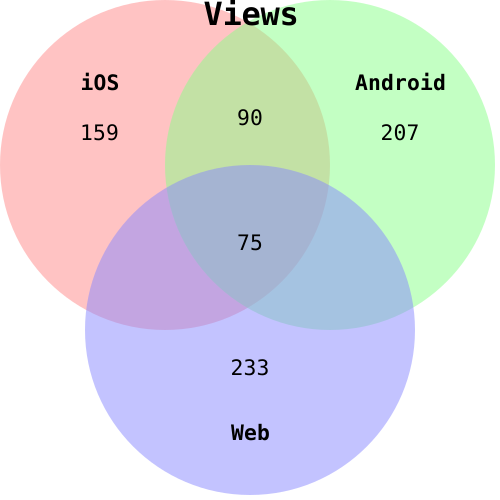
I'm not going to bother trying to make the areas actually proportional to the
lines of code. But, here's a rough picture of code sharing:
If you can't see those images, then you'll need to find a browser that understands
SVG until I can be bothered to convert to PNG. (Pull requests welcome!)
## Conclusions revisited
As before, most of the models code is shared between web and both native
platforms. What's unique is mostly boilerplate wrapping [the localStorage /
asyncStorage split between web and native][storagesplit].
[storagesplit]: http://blog.lmorchard.com/2015/07/22/react-multiplatform/#forking-sharing-model-code-for-persistence
On the view side, however, things are a bit more spread out. In a nutshell,
React patterns in general allow a decent chunk of code to be shared between
web and native. And even more code can be shared between the iOS and Android
platforms.
But, unique concerns in each platform - web, iOS, and Android - call for
unique code for each case. This is not actually a failing, though: Varying the
UX between web & iOS & Android is a flexibility you'll probably appreciate.
In other words, use components & conventions unique to each
platform without your app suffering from the lowest-common-denominator UX
problem historically found in a lot of multi-platform apps. In the case of this
TODO app, that just boils down to trivialities like checkboxes & switches &
segmented controls. In a larger app, I'd expect this concern to grow.
I'm being lazy and not coding up the math in percentages. This approach shared
about half the code from the web app, and even more than that for each of the
native apps. I think that's a significant advantage over writing separate
apps.
Of course, [all my caveats from the first go
around][caveats] still apply: This is a very simple app. The code devoted to
doing interesting things versus React boilerplate is probably not at a good
ratio. Also, as more view components arise, further overlap might be found.
And, hopefully, common logic would remain the primary area of growth on the
model site.
[caveats]: http://blog.lmorchard.com/2015/07/22/react-multiplatform/#conclusion
I think this approach toward building apps remains interesting & promising.
 If you can't see those images, then you'll need to find a browser that understands
SVG until I can be bothered to convert to PNG. (Pull requests welcome!)
## Conclusions revisited
As before, most of the models code is shared between web and both native
platforms. What's unique is mostly boilerplate wrapping [the localStorage /
asyncStorage split between web and native][storagesplit].
[storagesplit]: http://blog.lmorchard.com/2015/07/22/react-multiplatform/#forking-sharing-model-code-for-persistence
On the view side, however, things are a bit more spread out. In a nutshell,
React patterns in general allow a decent chunk of code to be shared between
web and native. And even more code can be shared between the iOS and Android
platforms.
But, unique concerns in each platform - web, iOS, and Android - call for
unique code for each case. This is not actually a failing, though: Varying the
UX between web & iOS & Android is a flexibility you'll probably appreciate.
In other words, use components & conventions unique to each
platform without your app suffering from the lowest-common-denominator UX
problem historically found in a lot of multi-platform apps. In the case of this
TODO app, that just boils down to trivialities like checkboxes & switches &
segmented controls. In a larger app, I'd expect this concern to grow.
I'm being lazy and not coding up the math in percentages. This approach shared
about half the code from the web app, and even more than that for each of the
native apps. I think that's a significant advantage over writing separate
apps.
Of course, [all my caveats from the first go
around][caveats] still apply: This is a very simple app. The code devoted to
doing interesting things versus React boilerplate is probably not at a good
ratio. Also, as more view components arise, further overlap might be found.
And, hopefully, common logic would remain the primary area of growth on the
model site.
[caveats]: http://blog.lmorchard.com/2015/07/22/react-multiplatform/#conclusion
I think this approach toward building apps remains interesting & promising.
If you can't see those images, then you'll need to find a browser that understands
SVG until I can be bothered to convert to PNG. (Pull requests welcome!)
## Conclusions revisited
As before, most of the models code is shared between web and both native
platforms. What's unique is mostly boilerplate wrapping [the localStorage /
asyncStorage split between web and native][storagesplit].
[storagesplit]: http://blog.lmorchard.com/2015/07/22/react-multiplatform/#forking-sharing-model-code-for-persistence
On the view side, however, things are a bit more spread out. In a nutshell,
React patterns in general allow a decent chunk of code to be shared between
web and native. And even more code can be shared between the iOS and Android
platforms.
But, unique concerns in each platform - web, iOS, and Android - call for
unique code for each case. This is not actually a failing, though: Varying the
UX between web & iOS & Android is a flexibility you'll probably appreciate.
In other words, use components & conventions unique to each
platform without your app suffering from the lowest-common-denominator UX
problem historically found in a lot of multi-platform apps. In the case of this
TODO app, that just boils down to trivialities like checkboxes & switches &
segmented controls. In a larger app, I'd expect this concern to grow.
I'm being lazy and not coding up the math in percentages. This approach shared
about half the code from the web app, and even more than that for each of the
native apps. I think that's a significant advantage over writing separate
apps.
Of course, [all my caveats from the first go
around][caveats] still apply: This is a very simple app. The code devoted to
doing interesting things versus React boilerplate is probably not at a good
ratio. Also, as more view components arise, further overlap might be found.
And, hopefully, common logic would remain the primary area of growth on the
model site.
[caveats]: http://blog.lmorchard.com/2015/07/22/react-multiplatform/#conclusion
I think this approach toward building apps remains interesting & promising.